Lisa Buck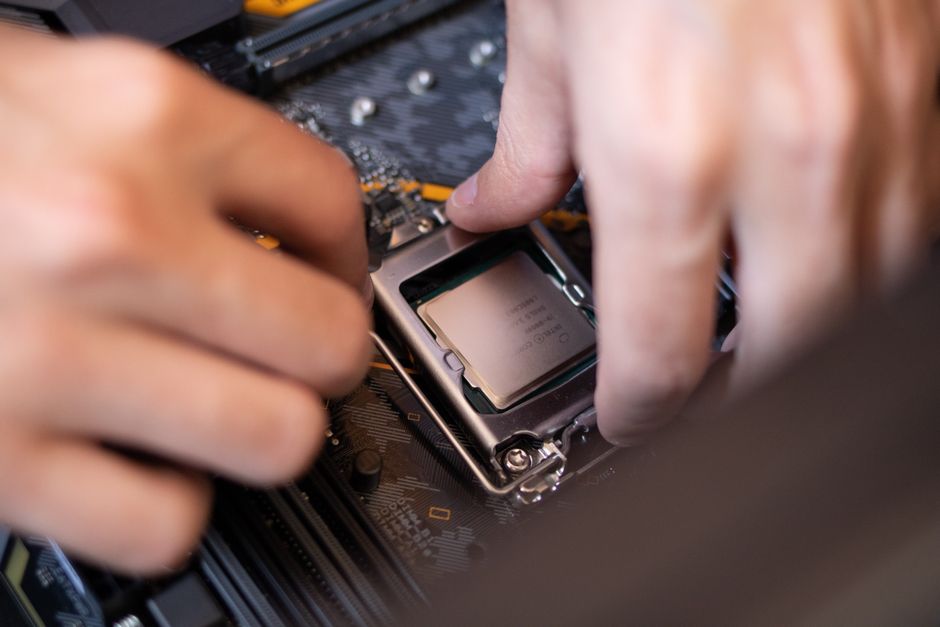
Installing a CPU in its socket without bent pins depends on alignment, a steady grip, and knowing when to stop. The processor should sit correctly before you close its retention mechanism. If it tilts, catches, or refuses to settle, pressure is not the solution. Prepare your work area first, then move through the installation slowly enough to inspect each stage.
Identify which contacts need protection
Desktop processors commonly use land grid array, or LGA, connections or pin grid array, or PGA, connections. With LGA, the CPU has flat contact pads underneath, while delicate spring contacts sit inside the motherboard socket. With PGA, the pins are on the processor and enter matching holes in the socket.
Handle either processor by its edges. Keep fingers away from its underside, and never touch an exposed LGA socket’s contacts. A small sideways movement across those contacts can damage them. PGA pins also need protection from fingers, packaging edges, and accidental contact with the workbench.
This guide covers common desktop sockets with locking levers. Platforms with processor carriers, sliding trays, multiple levers, or torque-controlled screws require their own installation sequence. Follow the motherboard instructions for those mechanisms rather than adapting a simpler socket’s procedure.
Prepare before opening the socket
Check that your exact processor appears on the motherboard manufacturer’s CPU support list. A matching socket does not guarantee complete compatibility, because firmware support also matters. Resolve compatibility questions before opening the processor packaging so you can concentrate on handling the hardware.
For an existing system, shut it down, switch off the power supply, and unplug its power cord. Leave a new build disconnected from power. Use appropriate electrostatic discharge precautions, such as a properly grounded antistatic wrist strap, and avoid working on carpet. Keep drinks and loose hardware away from the board.
Installing the CPU before mounting the motherboard in the case usually provides better visibility and access. Place the board horizontally on a stable, nonconductive surface, such as its cardboard box. Do not use the outside of an antistatic bag as a work mat. Arrange bright lighting so you can inspect the socket without holding a flashlight over it.
- Open the motherboard manual to the processor installation instructions.
- Keep the CPU’s protective tray available for temporary storage.
- Move screws and tools beyond the socket area.
- Leave the socket protector fitted until the instructions call for its removal.
Inspect the parts without touching contacts
Look at the processor’s underside under good light. Check for contamination, chipped edges, or visibly displaced pins on a PGA processor. When an LGA socket is exposed, inspect its contact pattern from different angles. A change in reflection alone does not establish damage, but an obviously displaced contact is a reason to stop.
Do not run a finger across contacts, probe them with a screwdriver, or brush the socket. If you see debris or suspect damage, keep the CPU out and contact the seller or manufacturer for guidance. Photograph questionable parts before attempting installation, particularly if the motherboard has just arrived.
Release the retention mechanism
LGA sockets with a load plate
Release the lever from its hook using the movement shown in the manual. This often involves pressing slightly downward and then moving away from the hook. Maintain control as you raise the lever rather than letting it spring upward. Open the metal load plate so it clears the processor’s path.
Protective cap handling varies between sockets. Some caps stay attached to the load plate until closing the mechanism releases them. Others must be removed earlier. Follow the instructions for your board, and avoid pulling a cap across exposed contacts. Save it to protect an empty socket during storage or shipping.
PGA sockets with a locking lever
Raise the locking lever fully to the position specified in the manual. This opens the mechanism that grips the processor pins. A partially raised lever can prevent insertion even when orientation is correct. Do not compensate by pressing on the CPU or pushing individual corners downward.
Align first, then lower vertically
Find the small triangle on the processor and identify its matching orientation mark using the motherboard manual. On keyed LGA packages, check that the edge notches match the socket’s locating features as well. Printed lettering is not a reliable orientation guide.
Pick up the CPU by two opposite edges with clean, dry hands. Keep it level above the socket and establish the correct direction before lowering it. Choose a grip that lets you release the package without dragging it sideways or knocking nearby components.
- Hold the CPU directly above the socket with its orientation marks aligned.
- Lower it vertically while keeping the package level.
- Allow it to settle into its intended position without pressing on its top.
- Release your edge grip carefully once the processor is supported.
Do not drop the CPU from a height or slide it across an LGA socket to find the right position. A PGA processor should enter an open socket without insertion force. An LGA processor should rest evenly within its locating features before the load plate supplies clamping pressure.
Check seating before applying retention pressure
Look from more than one side. The processor should sit level, with its corners positioned consistently within the socket. A raised corner, visible tilt, or package caught on a locating feature means installation should stop. Do not wiggle the processor or press its corners to test the fit.
If seating looks wrong, lift the CPU straight up by its edges and return it to its tray. Recheck orientation, compatibility, and whether the retention mechanism is fully open. Inspect for obstruction or damage before trying again. Repeatedly lowering an uncertain fit creates more opportunities for an accidental slip.
Once seating is correct, close the retention mechanism in the manual’s sequence. For an LGA socket, ensure the load plate engages its intended retaining feature before lowering the lever. Keep control of the lever throughout its travel and secure it beneath its hook.
Seating the CPU and clamping it are separate steps. An LGA lever can require firm pressure because it compresses the socket’s spring contacts against the processor. That pressure belongs at the retention stage. If the plate catches the package incorrectly, the processor shifts, or resistance seems abnormal, stop and inspect instead of forcing the lever.
Protect the seated CPU during cooler installation
Install the cooling system according to the cooler and motherboard instructions. Support the board appropriately, keep mounting hardware away from exposed electronics, and tighten the mount in its specified sequence. Cooler pressure cannot correct an improperly seated processor.
Before applying power, verify that the retention lever is secured, the cooler is mounted, and the required fan or pump connections are made. Never power the processor without its cooling system installed. If the completed system fails to start, check power connections and diagnostic indicators before deciding to remove the CPU again.
If you discover bent pins or displaced socket contacts, leave the system unpowered and seek repair or replacement guidance. Improvised tools can make delicate contact damage worse. Whenever alignment is uncertain, pause while the processor can still be lifted away safely.

 Lisa Buck